|
혹시나 하는 마음에 참고하시라고 올려봅니다.
문제가 된다면 며칠후 삭제해 주시기 바랍니다.
출처는
Borland C++BuilderT 6 Developer's Guide
Copyright © 2003 by Sams Publishing
입니다.
Using C++Builder DLLs with Microsoft Visual C++
Sometimes it's important to be sure that programs created by other compilers such as Visual C++ or Visual Basic can access a DLL created by C++Builder. This ensures other vendors can write applications that can access the DLL. There shouldn't be much difficulty for a Visual C++ application to dynamically link a C++Builder DLL by using LoadLibrary(), GetProcessAddress(), and FreeMemory() during execution. But for static linking, which requires a LIB file, compatibility between Visual C++ and C++Builder can be a much different matter. This is because of the different exporting conventions used by the two different companies. As stated earlier, Microsoft supports the Common Object Format File (COFF), whereas Borland uses the Object Model Format (OMF). Fortunately, there is a way to create a Microsoft's COFF import library file that represents a Borland-built DLL.
To create an MS COFF import library file from a Borland OMF DLL a definition (DEF) file must first be created. This is accomplished using the Borland IMPDEF command-line tool at the DOS prompt.
impdef mybcbdll_coff.def mybcbdll.dll
This creates a definition file called mybcbdll_coff.def using the Borland IMPDEF utility, which extracts the function calls from mybcbdll.dll. Now, to keep the names consistent so the Microsoft linker knows exactly what to look for in the library representing the DLL, it's important to modify the newly created .def file and remove the additional underscore in front of the function names. For example, suppose the definition file created previously looks like the following:
LIBRARY MYBCBDLL.DLL
EXPORTS
@@Aboutform@Finalize @4 ; __linkproc__ Aboutform::Finalize
@@Aboutform@Initialize @3 ; __linkproc__ Aboutform::Initialize
_AboutBox @2 ; _AboutBox
_FormAbout @6 ; _FormAbout
_MsgQuery @1 ; _MsgQuery
___CPPdebugHook @5 ; _
Notice the underscores; they need to be removed. The .def file should be modified as follows:
LIBRARY MYBCBDLL.DLL
EXPORTS
@@Aboutform@Finalize @4 ; __linkproc__ Aboutform::Finalize
@@Aboutform@Initialize @3 ; __linkproc__ Aboutform::Initialize
AboutBox @2 ; _AboutBox
FormAbout @6 ; _FormAbout
MsgQuery @1 ; _MsgQuery
___CPPdebugHook @5 ; ___CPPdebugHook
Next, the Microsoft Library Manager (LIB)c utility, which ships with Microsoft Visual C++, should be used to create the COFF import library file as follows:
lib /DEF:mybcbdll_coff.def
NOTE
Make sure to have access to the lib command-line program located in the Visual C++ bin directory by including this folder as part of the system Path.
The mybcbdll_coff.lib, which is generated by issuing the preceding command line, can now be added and linked by a Microsoft Visual C++ project.
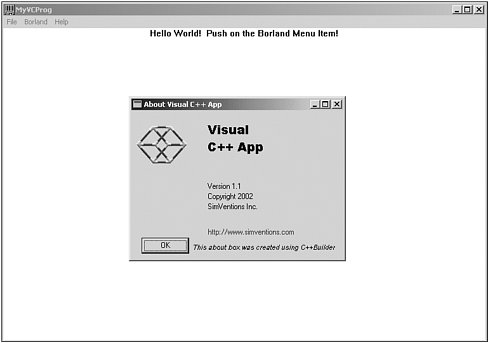
Figure 16.18 provides an illustration of a Visual C++ application using a form contained with a C++Builder DLL. The code for both the C++Builder DLL and the Visual C++ example application is provided on the CD-ROM under the MyVCProg folder. (Library Manager)
박영목 님이 쓰신 글 :
: 현재 VC에서 아래와 같이 하고 있는데....
:
: HINSTANCE hDll = LoadLibrary("BuilderDLL.dll");
: pFunction = (MYPROC)GetProcAddress(hDll, "DlgSetup");
:
: lib를 사용하여 바로 연결되어야 할 것 같습니다.
:
: 위와 같이 하면 DLL에서 폼을 열면 TASKBAR에 하나의 ICON이 생기며 동작하네여...
: 이것 때문에 좀 이상합니다.
:
: Lib를 사용하면 이렇게 되지 않을 것 같습니다. VC++에서 만든 DLL Builder에서 lib를 사용해서 열면..
: TASKBAR에 ICON 생기지 않기 때문에... 이게 정상으로 동작하는 것 같은데.... 아니 이게 원하는 것인데...
:
: 어느 사이트 가니까? MS, Insprise 모두 OMF2COFF 로 변환하는 것을 제공하지 않다고 하는데....
:
: DEF 파일을 사용하면 된다고 하는 것 같은데.. 이해가 안감.....
:
: 방법이 없을까????? 고밍......되네..... 아주 고밍..... 아시는 분 부탁드립니다.
|