|
[ bmp 파일 포멧에 대해]
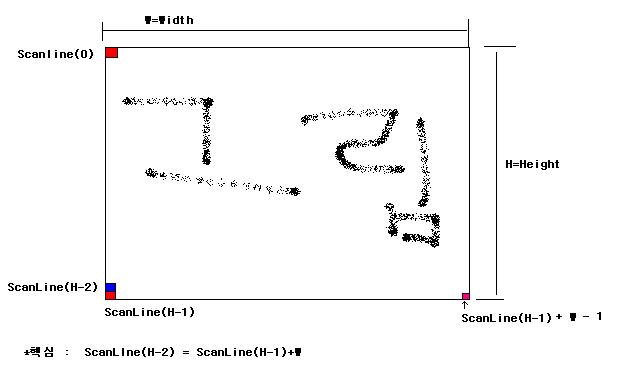
BMP 파일을 Hex Editer로 열어보면 실제 데이타는
이미지의 맨 끝에 라인부터 파일에 기록되어 있습니다.
Graphics::TBitmap 에서 ScanLine을 이용해 Data의 Pointer를 가져오는데
중요한것은
ScanLine(0) 에서 Width 만큼 Pointer를 증가하면 ScanLine(1) 이 아니구
실제로는 그 반대로 되어있습니다.
첫번째 줄 ScanLine(0) 에서 다음줄로 가려면 포인터를 Width 만큼 더해주는것이 아니라 빼줘야합니다.
그러니까 ScanLine(1) = ScanLine(0) - Width 이렇게 되죠
다시말하면 맨아랫줄 ScanLine(Height -1 ) 부터 한라인씩 파일에 기록되며
맨끝에 첫번째 라인이 기록됩니다.
보통 bmp파일이 그렇게 되어있구요
TBitmap에서도 파일에 있는 순서대로 읽어옵니다.
[PixcelFormat 에 대해]
프로그램에 보면 PixcelFormat = pf32bit 로 했잖아
32bit 는 4Byte 이므로 int * (int형 포인트)로 + , - 하면서 움직이면 한 Pixcel씩 움직이게 되죠
다시말해 ScanLine을 int * 로 받아왔기 때문에
+1 ( 플러스 1 ) 또는 - 1 (마이너스 1 ) 하면 4Byte씩 주소가 움직이는겁니다.
Width 만큼 더하거나 빼면 포인터가 4*Width 만큼 움직이겠죠
샘플 코드에 주석이 좀 부족했남?
==========================================================================================
//---------------------------------------------------------------------------
typedef struct _PIXCEL
{
int *pxl;
int w;
int h;
}PIXCEL;
//---------------------------------------------------------------------------
bool __fastcall TForm1::FindIconRect(Graphics::TBitmap *bmp)
{
int wid=bmp->Width;
int hei=bmp->Height;
int * pt;
ptLst->Clear();
TRect rc;
for(int h=0;h<hei;h++)
{
pt=(int *)bmp->ScanLine[h];
for(int w=0;w<wid;w++)
{
if(*pt!=bkClr)
{
AddPixcel(pt,w,h);
rc.left=w;
rc.right=w;
rc.top=h;
rc.bottom=h;
h=hei;
break;
}
pt++;
}
}
if(ptLst->Count<1)return false;
PIXCEL *px;
while(ptLst->Count) //특정 Pixcel로 부터 그와 연결된 모든 Pixcel을 찾아서 그pixcel들의 상/하/좌/우 가장자리를 찾는다.
{
px=(PIXCEL *)ptLst->Items[0];
// 현재 pixcel이 지금까지 찾은 Rect 경계와 비교
if(px->w<rc.left)rc.left=px->w;
else if(px->w>rc.right)rc.right=px->w;
if(px->h<rc.top)rc.top=px->h;
else if(px->h>rc.bottom)rc.bottom=px->h;
// 현재 Pixcel의 상/하/좌/우/대각선 4 군데서 벼경색 bkClr 과 다른색이 있는지 찾는다.
if(px->w<(wid-1)) //오른쪽
{
pt=px->pxl+1; // 현재 Pixcel의 오른쪽 Pixcel 확인
if(*pt!=bkClr)
{
AddPixcel(pt,px->w+1,px->h);
}
}
if(px->w > 0) //왼쪽
{
pt=px->pxl-1; // 현재 Pixcel의 왼쪽 Pixcel 확인
if(*pt!=bkClr)
{
AddPixcel(pt,px->w-1,px->h);
}
}
if(px->h<(hei-1)) //아랫쪽
{
pt=px->pxl-wid; // 현재 Pixcel의 한 Line 아랫쪽 Pixcel확인
// wid 만큼 빼면 Iimage에서 아랫쪽 line이 된다. ----------- 중요 :
if(*pt!=bkClr)
{
AddPixcel(pt,px->w,px->h+1);
}
//-----------------
if(px->w<(wid-1)) //아랫쪽 -오른쪽 대각선
{
pt=px->pxl-wid+1; // 현재 Pixcel의 한 Line 아랫쪽 의 오른쪽 Pixcel확인
if(*pt!=bkClr)
{
AddPixcel(pt,px->w+1,px->h+1);
}
}
if(px->w > 0) //아랫쪽 -왼쪽 대각선
{
pt=px->pxl-wid-1; // 현재 Pixcel의 한 Line 아랫쪽 의 왼쪽 Pixcel확인
if(*pt!=bkClr)
{
AddPixcel(pt,px->w-1,px->h+1);
}
}
}
if(px->h > 0)//윗쪽
{
pt=px->pxl+wid; // 현재 Pixcel의 한 Line 윗쪽 Pixcel확인
if(*pt!=bkClr)
{
AddPixcel(pt,px->w,px->h-1);
}
//-----------------
if(px->w<(wid-1)) //윗쪽 -오른쪽 대각선
{
pt=px->pxl+wid+1; // 현재 Pixcel의 한 Line 윗쪽 의 오른쪽 Pixcel확인
if(*pt!=bkClr)
{
AddPixcel(pt,px->w+1,px->h-1);
}
}
if(px->w > 0) //윗쪽 -왼쪽 대각선
{
pt=px->pxl+wid-1; // 현재 Pixcel의 한 Line 윗쪽 의 왼쪽 Pixcel확인
if(*pt!=bkClr)
{
AddPixcel(pt,px->w-1,px->h-1);
}
}
}
px->pxl[0] =bkClr;
ptLst->Delete(0);
delete px;
}
//bitmap에서 방금 찾은 영역 Rect를 Clear한다.
//그래서 다시 호출할때는 찾아지지 않도록
bmp->Canvas->Pen->Color=bkClr;
bmp->Canvas->Brush->Color=bkClr;
bmp->Canvas->Brush->Style=bsSolid;
bmp->Canvas->Rectangle(rc);
String str;
str.sprintf("%d , %d , %d , %d ",rc.left,rc.top,rc.right,rc.bottom); // 찾은 영역 Rect를 StringList에 기록해둔다.
rcLst->Add(str);
return true;
}
//---------------------------------------------------------------------------
// 이미 같은 픽셀이 List에 등록되어잇는지 없는지 확인하구 없으면 추가한다.
void __fastcall TForm1::AddPixcel(int *pt,int w,int h)
{
PIXCEL *pix;
for(int i=0;i<ptLst->Count;i++)
{
pix=(PIXCEL *)ptLst->Items[i];
if(pix->pxl==pt)return;
}
pix=new PIXCEL;
pix->pxl=pt;
pix->w=w;
pix->h=h;
ptLst->Add(pix);
}
//---------------------------------------------------------------------------
void __fastcall TForm1::Btn_FindIconsClick(TObject *Sender)
{
bkClr = ColorBox->Selected ;
rcLst=new TStringList;
ptLst=new TList;
Image1->Picture->Bitmap->PixelFormat=pf32bit;
Graphics::TBitmap *bmp=new Graphics::TBitmap;
bmp->Assign(Image1->Picture->Bitmap);
// int itic=GetTickCount();
while(FindIconRect(bmp)); // 이미지의 Icon영역을 찾는다.
// itic=GetTickCount()-itic;
// ShowMessage(itic);
TStringList *lst=new TStringList;
TRect rc;
Image1->Picture->Bitmap->Canvas->Pen->Color=clRed;
Image1->Picture->Bitmap->Canvas->Brush->Style=bsClear;
for(int i=0;i<rcLst->Count;i++) // 찾응 Icon영역을 TImage에 그려준다.
{
lst->Clear();
lst->CommaText=rcLst->Strings[i];
rc.left=StrToInt(lst->Strings[0]);
rc.top=StrToInt(lst->Strings[1]);
rc.right=StrToInt(lst->Strings[2])+1;
rc.bottom=StrToInt(lst->Strings[3])+1;
Image1->Picture->Bitmap->Canvas->Rectangle(rc);
}
delete lst;
delete bmp;
delete ptLst;
delete rcLst;
}
//---------------------------------------------------------------------------
그럼..
한충희 님이 쓰신 글 :
: 성호님 정말 죄송합니다 하루 왼종일 바도 모르겠어요
: 그냥 가져다 쓰는 것도 말도 안되는거 같구
: 정말 죄송하지만 픽셀 나가는 방향을 그림으로 아니면 순서라도
: 알려주시면 안될까요???
: 귀찮게 해서 죄송합니다
|