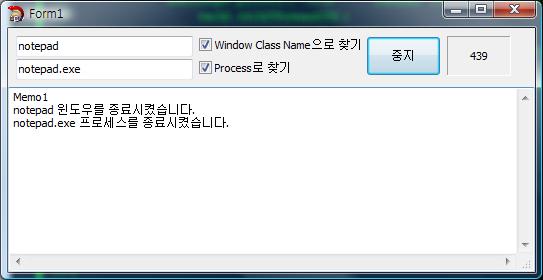
첨부한 소스코드 참고하세요.
C++ Builder 2010으로 작성된 코드입니다.
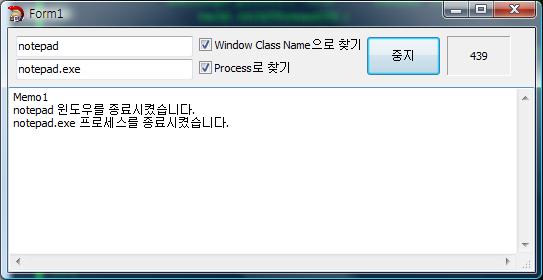
void __fastcall TForm1::Timer1Timer(TObject *Sender)
{
    static int nCount = 0;
    Panel1->Caption = nCount++;

    if(CheckBox1->Checked) {
        AnsiString sClassName = Edit1->Text;

        HWND wnd = FindWindow(sClassName.c_str(), NULL);

        if (wnd)
        {
            PostMessage(wnd, WM_SYSCOMMAND, SC_CLOSE, 0); // <===== 윈도우 Close 시킴.
            AnsiString sMessage;
            sMessage.printf("%s 윈도우를 종료시켰습니다.", sClassName.c_str());
            Memo1->Lines->Add(sMessage);
        }
    }

    if(CheckBox2->Checked) {
        AnsiString sProcessName = Edit2->Text;

        HANDLE hProcessSnap;
        HANDLE hProcess;
        PROCESSENTRY32 pe32;
        DWORD dwPriorityClass;

        // Take a snapshot of all processes in the system.
        hProcessSnap = CreateToolhelp32Snapshot(TH32CS_SNAPPROCESS, 0);
        if (hProcessSnap == INVALID_HANDLE_VALUE)
        {
            return;
        }

        // Set the size of the structure before using it.
        pe32.dwSize = sizeof(PROCESSENTRY32);

        // Retrieve information about the first process,
        // and exit if unsuccessful
        if (!Process32First(hProcessSnap, &pe32))
        {
            CloseHandle(hProcessSnap); // Must clean up the snapshot object!
            return;
        }

        // Now walk the snapshot of processes, and
        // display information about each process in turn
        do
        {


            // Retrieve the priority class.
            dwPriorityClass = 0;
            hProcess = OpenProcess(PROCESS_ALL_ACCESS, FALSE, pe32.th32ProcessID);

            if(strcmp(sProcessName.c_str(), pe32.szExeFile) == 0) {
                TerminateProcess(hProcess,PROCESS_TERMINATE); // <===== 프로세스 종료 시킴.

                AnsiString sMessage;
                sMessage.printf("%s 프로세스를 종료시켰습니다.", pe32.szExeFile);
                Memo1->Lines->Add(sMessage);
            }
        }
        while (Process32Next(hProcessSnap, &pe32));

        CloseHandle(hProcessSnap);
    }
}
Scytale 님이 쓰신 글 :
: 네 그건알죠 ㅠㅠ
: 소스가 어떻게되요 그럼 ㅠㅠ?
: 제가초보라 아예몰라요 ㅠㅠㅠㅠㅠ
|